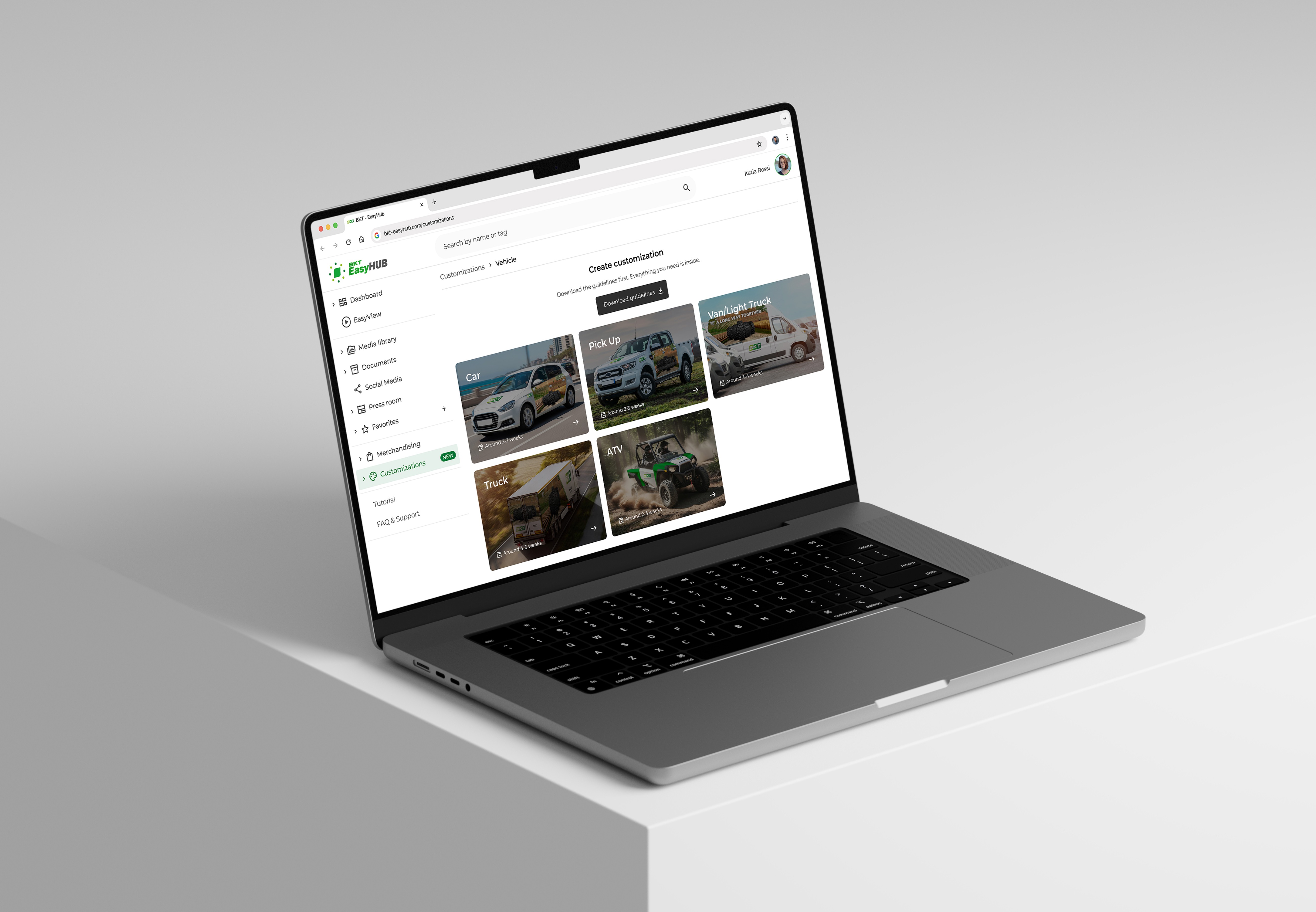
Client:
BKT
My Role:
Sole UX/UI Designer
Year:
2025 – 2026
Team:
1 Designer (me), 1 Product Manager, 2 Frontend, 3 Backend, 2 BKT Owners, 2 Graphic Design Contractors
Reading Time:
~7 min
Service Provided:
Discovery, UX Design, Testing, UI Design, Design System

The Challenge
BKT processes customization requests for Vehicles, Store, Printed Materials, ADV, Video and Exhibitions. Each one had its own rules, file formats and approval steps, but every request used the same broken process.
Vehicle Flow Specifically
Distributors had no clear guidelines on what BKT needed for each request
Requests came in by phone, email or WhatsApp, often missing key information
Once submitted, requests could not be tracked or edited
Owners had no system to assign requests, so the same person often handled every step, from first message to print file
Each request needed multiple follow-ups before owners could move forward
Understanding The Users
Before designing, I worked with the PM, BKT owners and Graphic Design contractors to map 3 user types, each with different goals, tasks and problems.
Distributors / Tire Dealers – Submitters
External users sending requests from dealerships worldwide. Busy, mixed digital skills, no training.
Design implications: guidelines before the form, a simple step-by-step form and a draft mode.
BKT Owners – Request Managers
2 people running every request worldwide, from first message to final file.
Design implications: 1 inbox per flow, clear status for each request and in-request comments for missing info.
Graphic Design Team – Producers
Contractors who make the artwork and print files. No contact with distributors.
Design implications: a clean handoff between owner and designer. The designer starts at "Accepted", delivers at "To be approved", finalises at "Final preparation".
Process
I worked with the PM, BKT Owners, Development Team and Graphic Design Contractors over 8 months. Each of the 6 flows took around 6 weeks, end to end, with 3+ rounds of review per flow.
My work covered information architecture, user flows, wireframes, UI design, modular components for the existing BKT design system, full frontstage and backstage state mapping, edge case documentation and complete dev handoff with specs.
I was the only designer in a cross-functional team. Design and development happened together, every day.
Before The Design
2 diagrams came before any screen. The first mapped the module structure, the second mapped the request lifecycle. Every design decision that follows starts from these 2.
Module Architecture
High-level view, mapped first to define what the module had to support. 6 request types, 3 entry points, 1 shared flow pattern. A detailed version was delivered to the dev team.
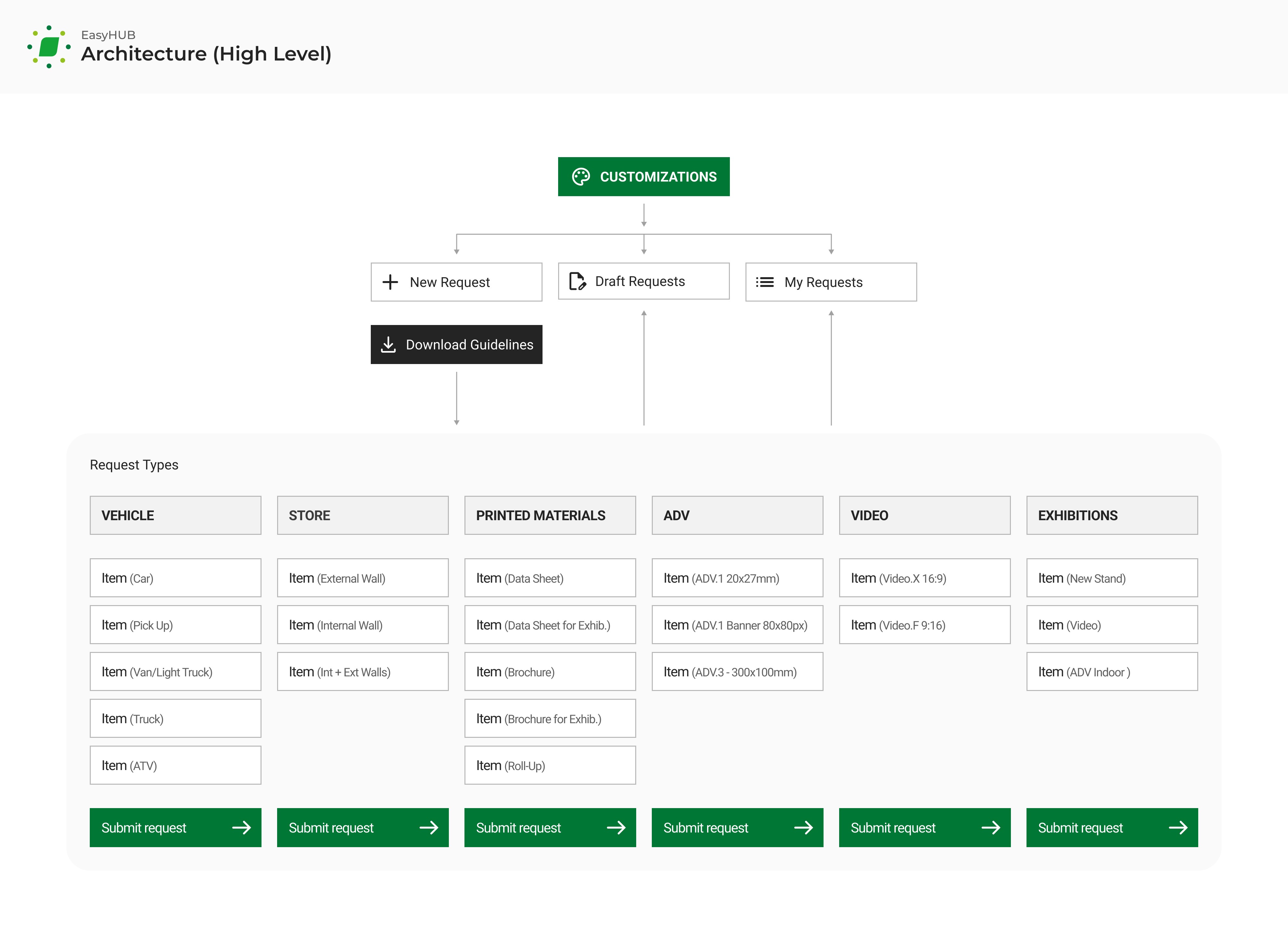
6 types, 1 shared flow. Each request handles 1 item. The elements within each type are different, but the flow remains the same.
**Singularity is structural, not copy: singular labels, no "Add another" button. The PDF guidelines say it once.
Request Lifecycle
Mapped to define the behavior of a request. Simplified into 7 phases here, with 2 parallel views for distributor and BKT, kept in sync by non-instant messaging. The full 14 states are mapped below.
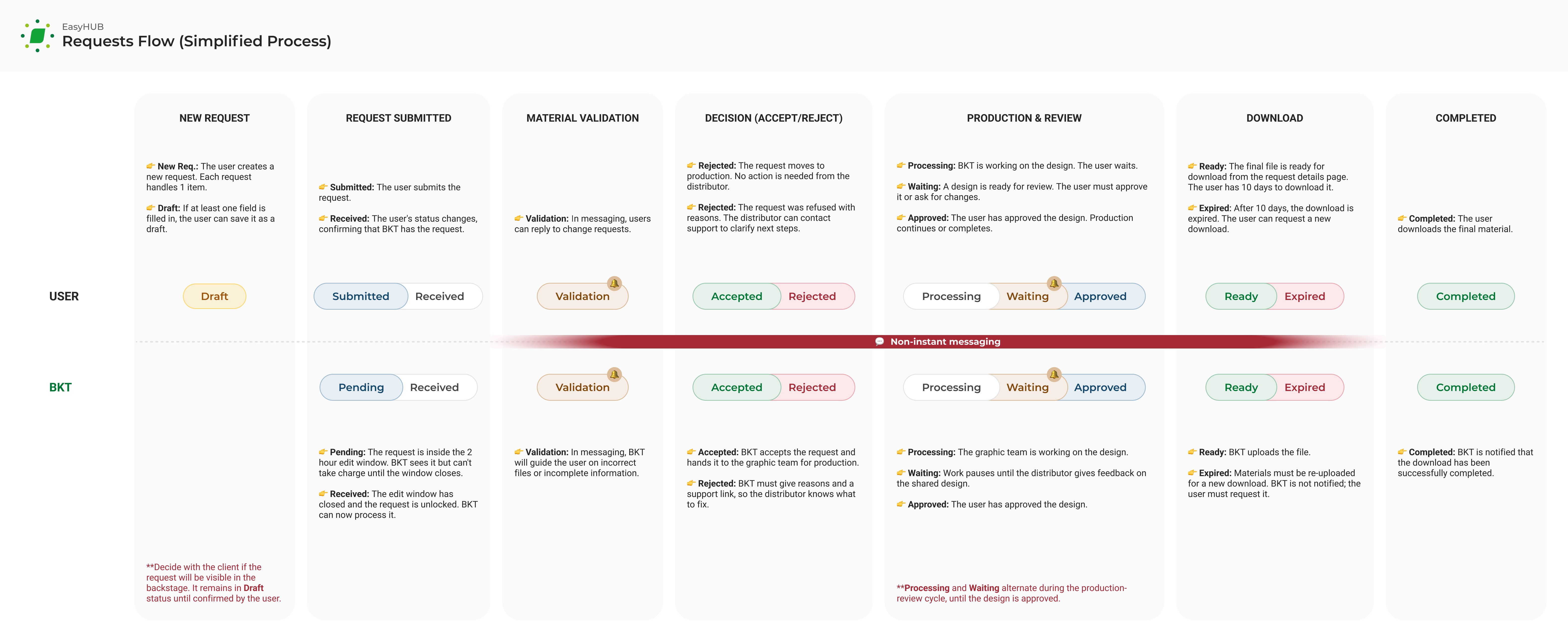
The distributor sees friendly labels, BKT sees operational states. Non-instant messaging keeps both sides moving without blocking each other.
State Mapping
All 14 states of the request lifecycle, each with role and action. The mapping became the reference document for dev handoff.
Frontstage: label visible to the actor
Backstage: internal system state
Actor: who triggers the next state change
Frontstage | Actor | Action Required | Backstage |
|---|---|---|---|
Phase 1 – Submission | |||
Draft | User | Edit draft → | – |
Deleted | User | – | Deleted |
Submitted | User | Change request → | Pending |
Received | BKT | – | Received |
Phase 2 – Decision | |||
Accepted | BKT | – | Accepted |
Rejected | BKT | View reason → | Rejected |
Phase 3 – Production loop ↻ | |||
Processing | BKT | – | Processing |
Waiting | BKT | – | Waiting |
Phase 4 – Approval | |||
To be approved | User | Review request → | To be approved |
Approved | User | – | Approved |
Phase 5 – Finalization | |||
Final preparation | BKT | – | Final preparation |
Phase 6 – Distribution | |||
Ready | User | Download material → | Ready |
Expired | User | – | Expired |
Completed | User | – | Completed |
**Processing and Waiting alternate during the production-review cycle, until the design is Approved.
Three Principles
3 principles guided every design decision in the module:
Self-service by design. Distributors contact BKT only at decision points. Most requests arrive complete on first submission.
Single hub, six flows. One architecture, 6 configurable flows. The vehicle flow is the template for the other 5.
Clear workflow. Owner accepts or rejects, designer produces, distributor reviews. No shared inboxes, no overlap, no ambiguity.
Design Decisions
7 decisions, 1 principle: trust the distributor. No asterisks, no forced order, no per-step validation. The summary catches what's missing at submit.
Vehicle type drives the form. Choosing truck, van or car up front shapes every field that follows.
Downloadable guidelines. A PDF lists every input the form needs, so distributors arrive prepared. Fewer incomplete requests.
Free navigation, no wizard. Distributors fill steps in any order. A rigid wizard would block the request.
Draft mode for unfinished requests. Save and finish later. No half-empty submissions.
One final review screen. A summary lists every value before submission. Missing or wrong fields are flagged in place. Validation runs once at submit, not step-by-step.
Two-hour edit window after submission. Distributors can fix mistakes within 2 hours. After that, the request is locked. Submit only when ready.
Ten-day download window for print files. Heavy files expire after 10 days. Owner re-uploads the approved file on request.
Vehicle Workflow Solution
The vehicle form runs in 5 steps. The design rests on 1 move: the form asks for what only the distributor knows. Everything else, the system handles. The same approach shaped the other 5 flows.
Step 1: Vehicle
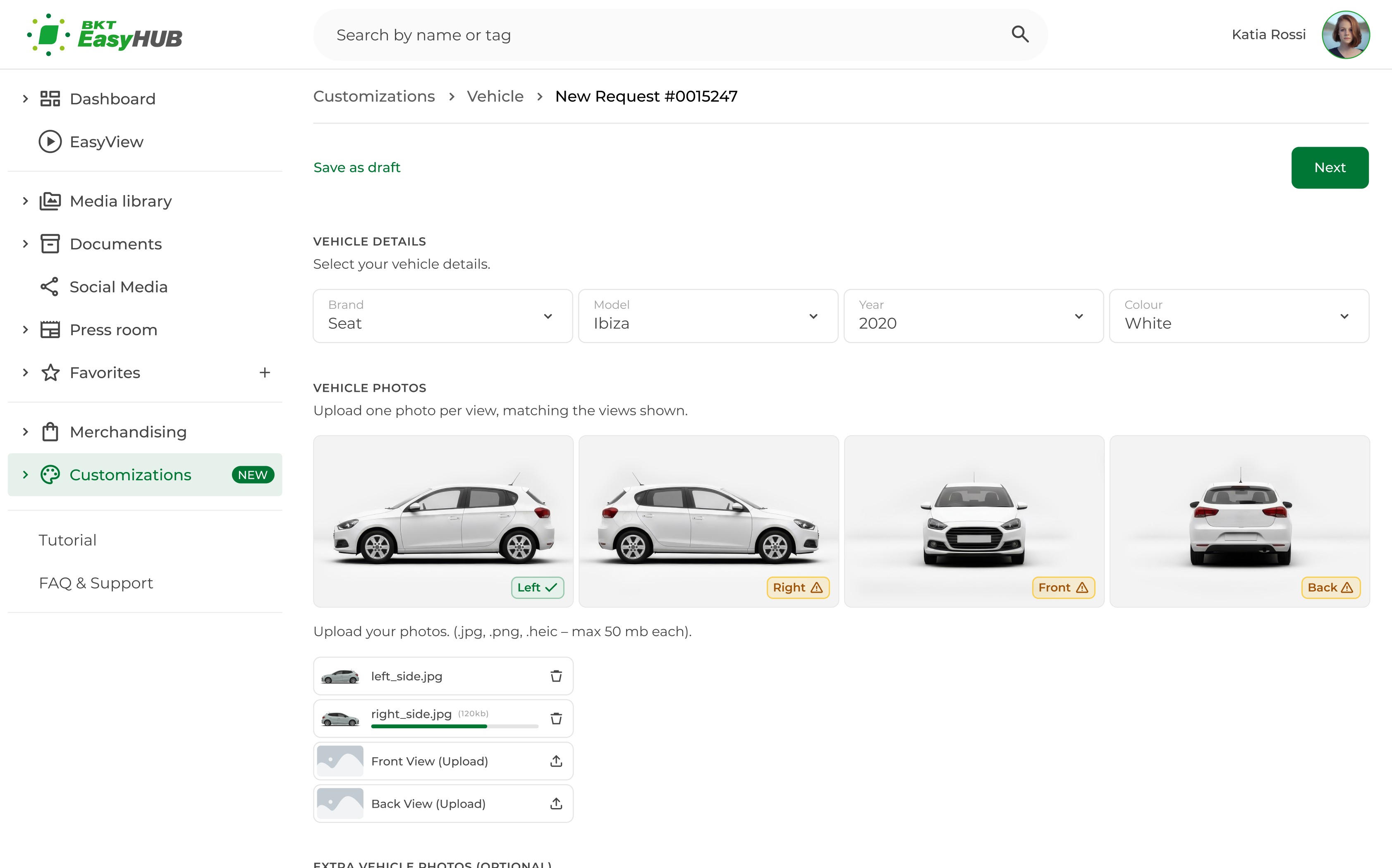
Vehicle. Brand, model, year and colour set the context. Each upload slot pairs with a reference image labelled by view (left, right, front, back). Status badges show what's done and what's missing.
Step 2: Customization
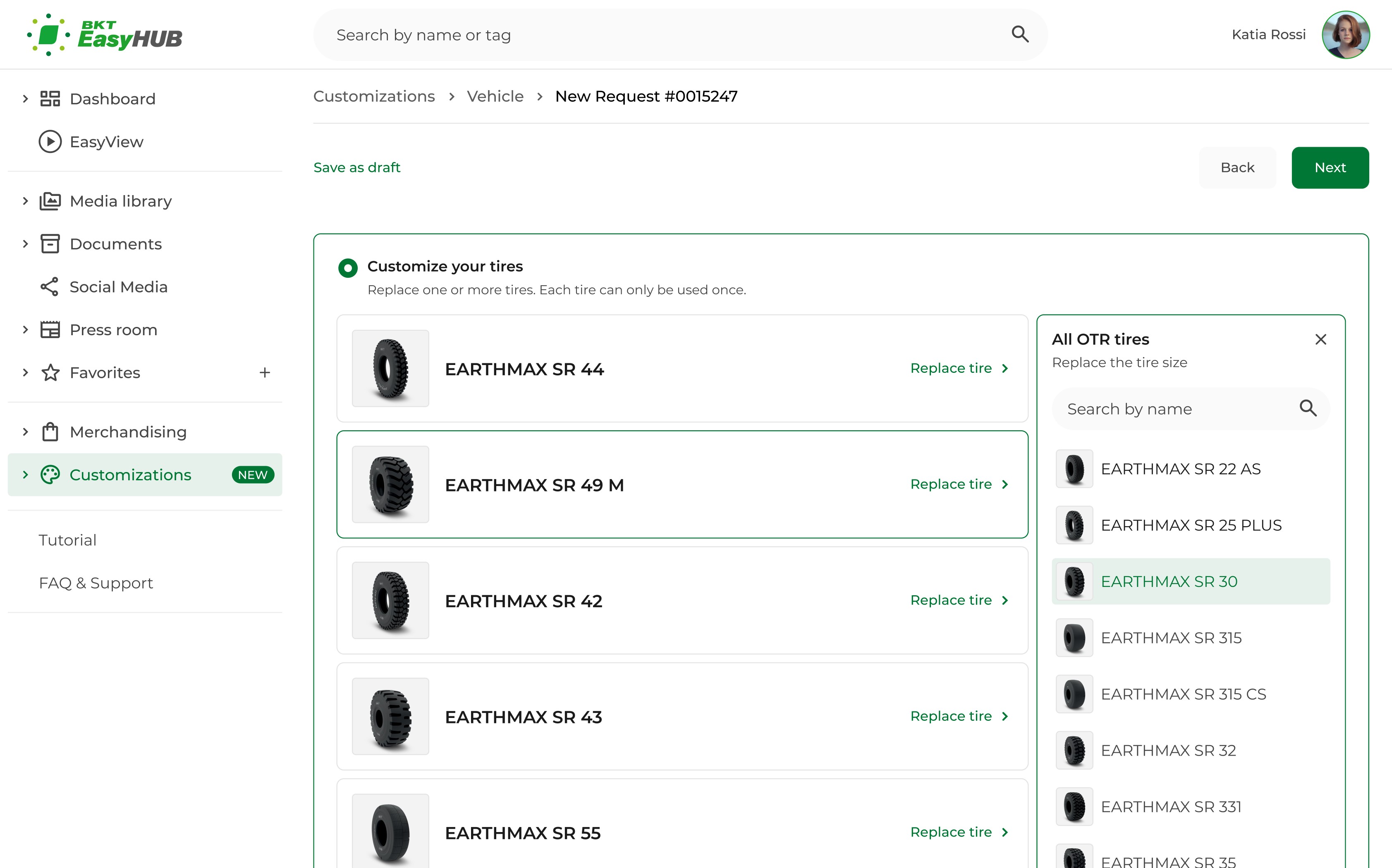
Tires. 2 ways to customize graphic from the segment chosen earlier: BKT’s default setup, or a custom selection from the filtered list.
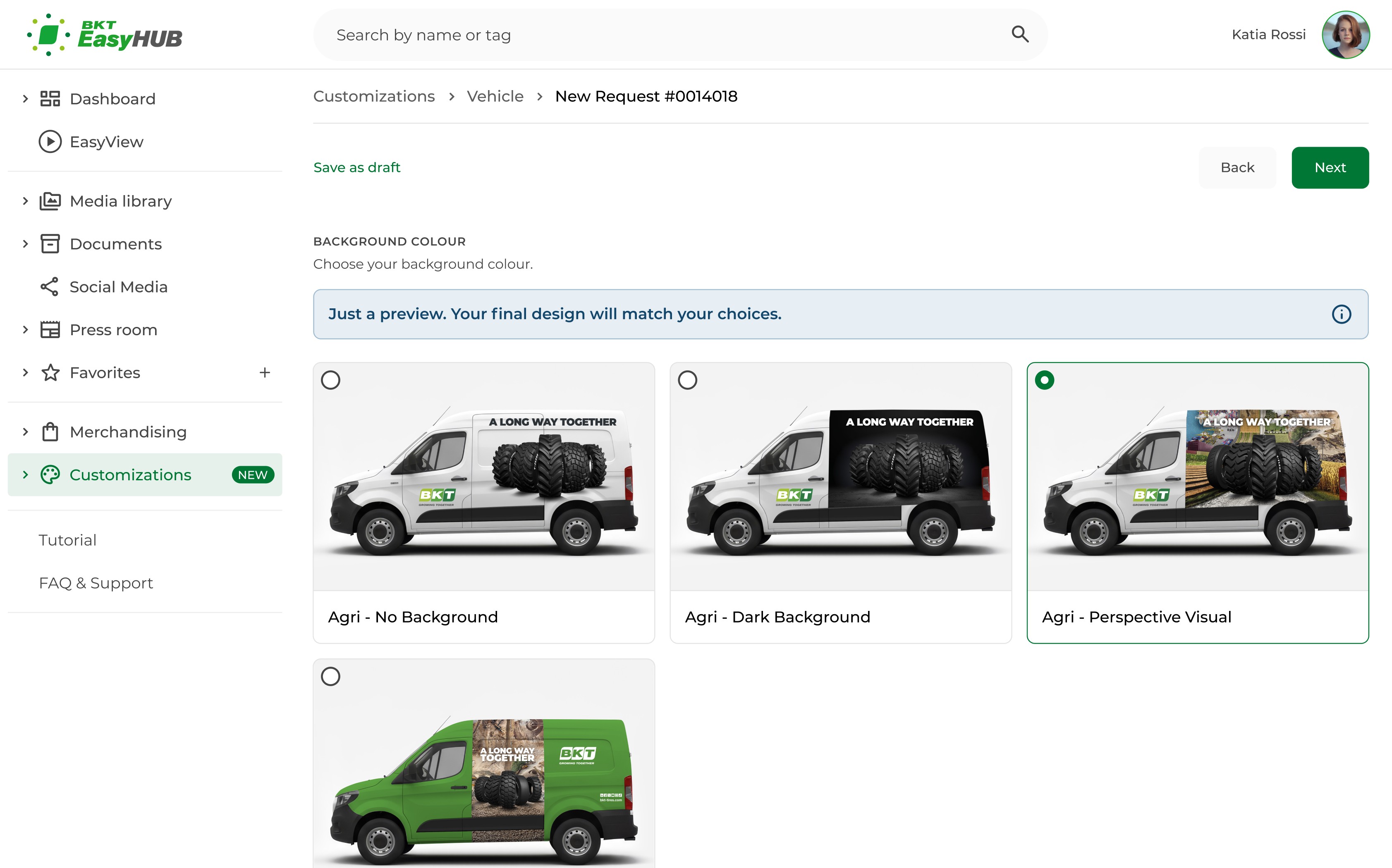
Background. The options come from the tire range chosen earlier, so the distributor only sees backgrounds that fit the vehicle.
Step 3: Sizes
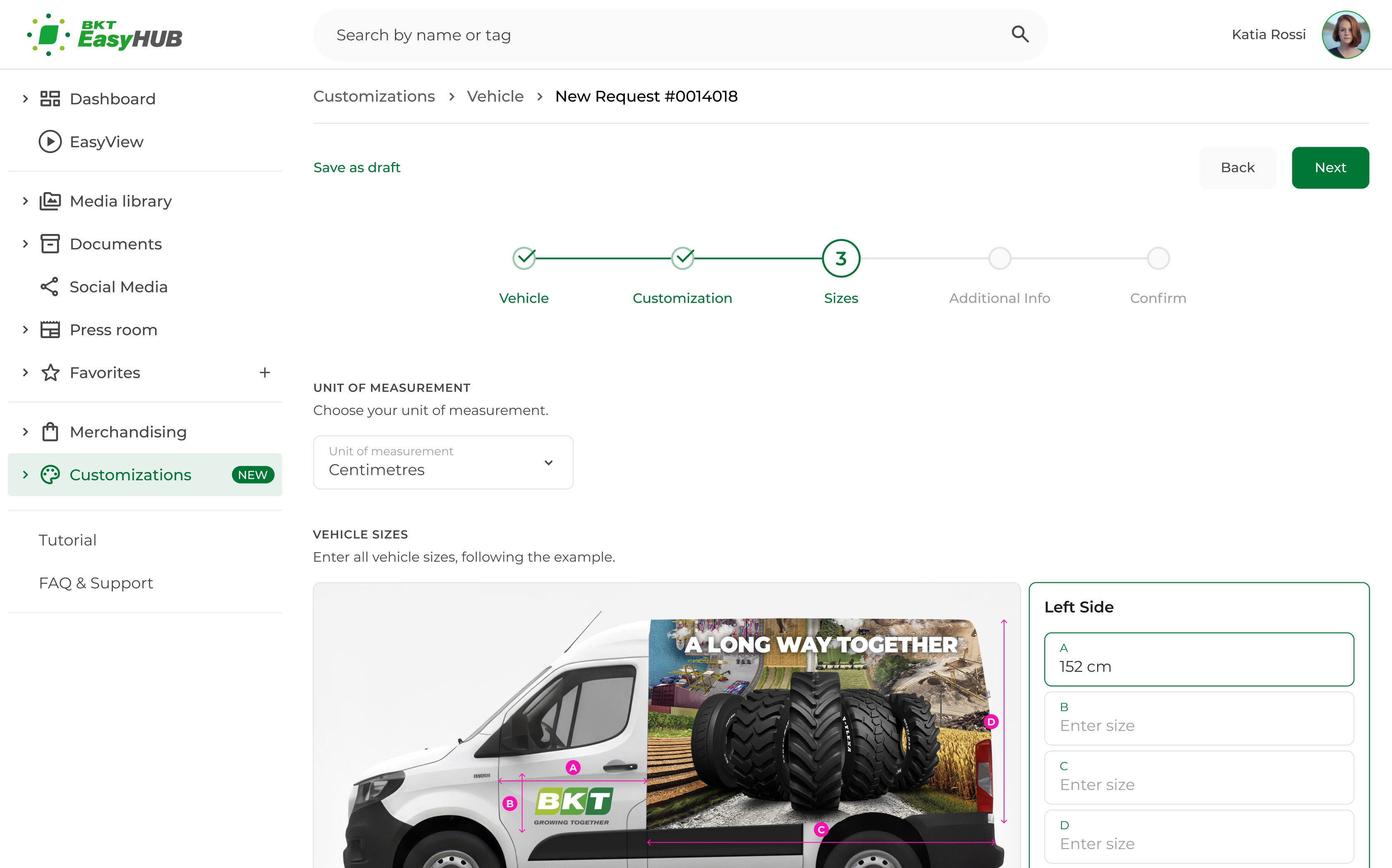
Sizes. Every measurement point on the vehicle has a label (A, B, C, D) and a matching input field. The distributor selects the unit of measurement before starting.
Step 4: Additional Info
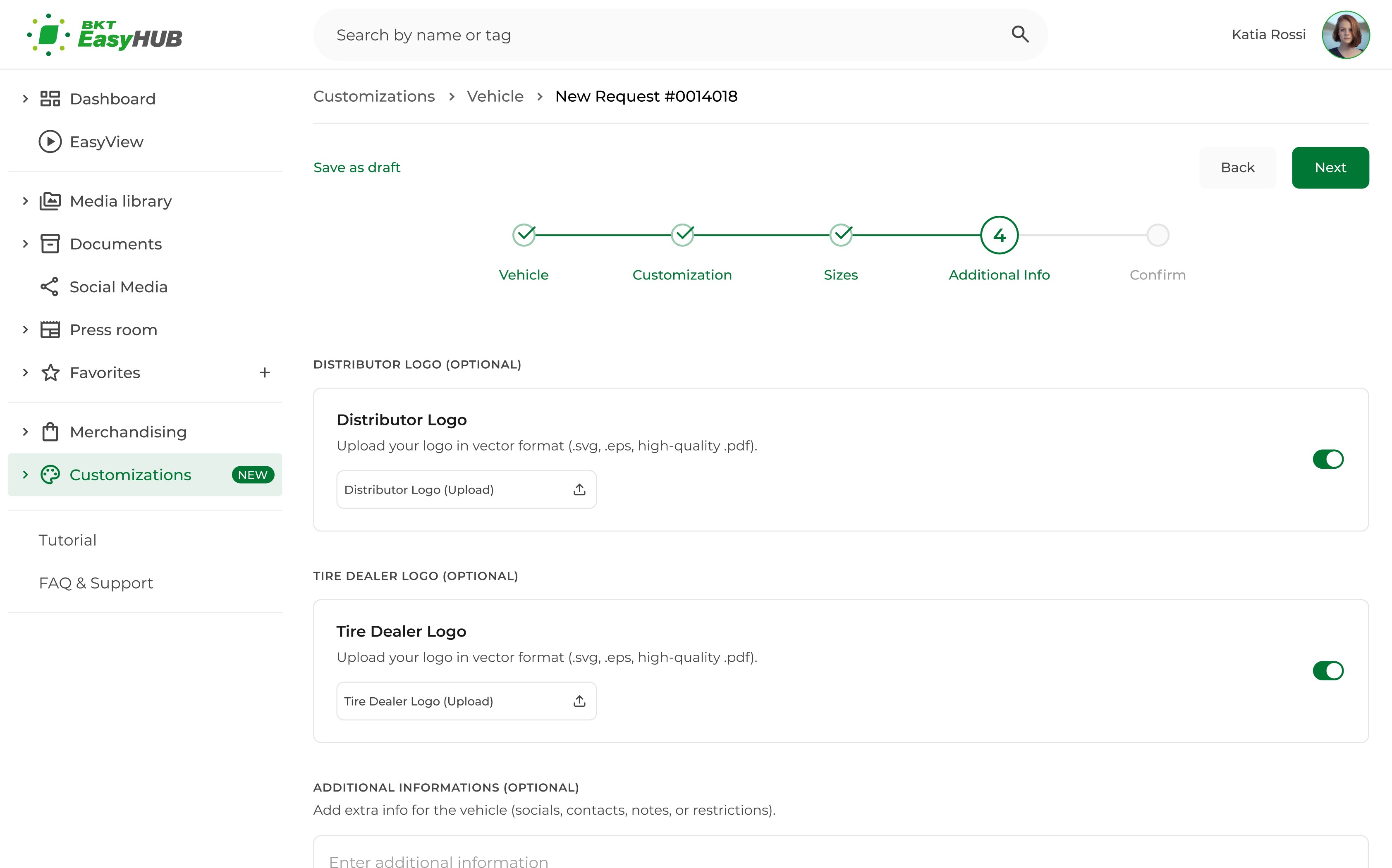
Additional Info. Optional branding and notes. Logos in vector format (.svg, .eps, .pdf), plus any extra info.
Step 5: Confirm
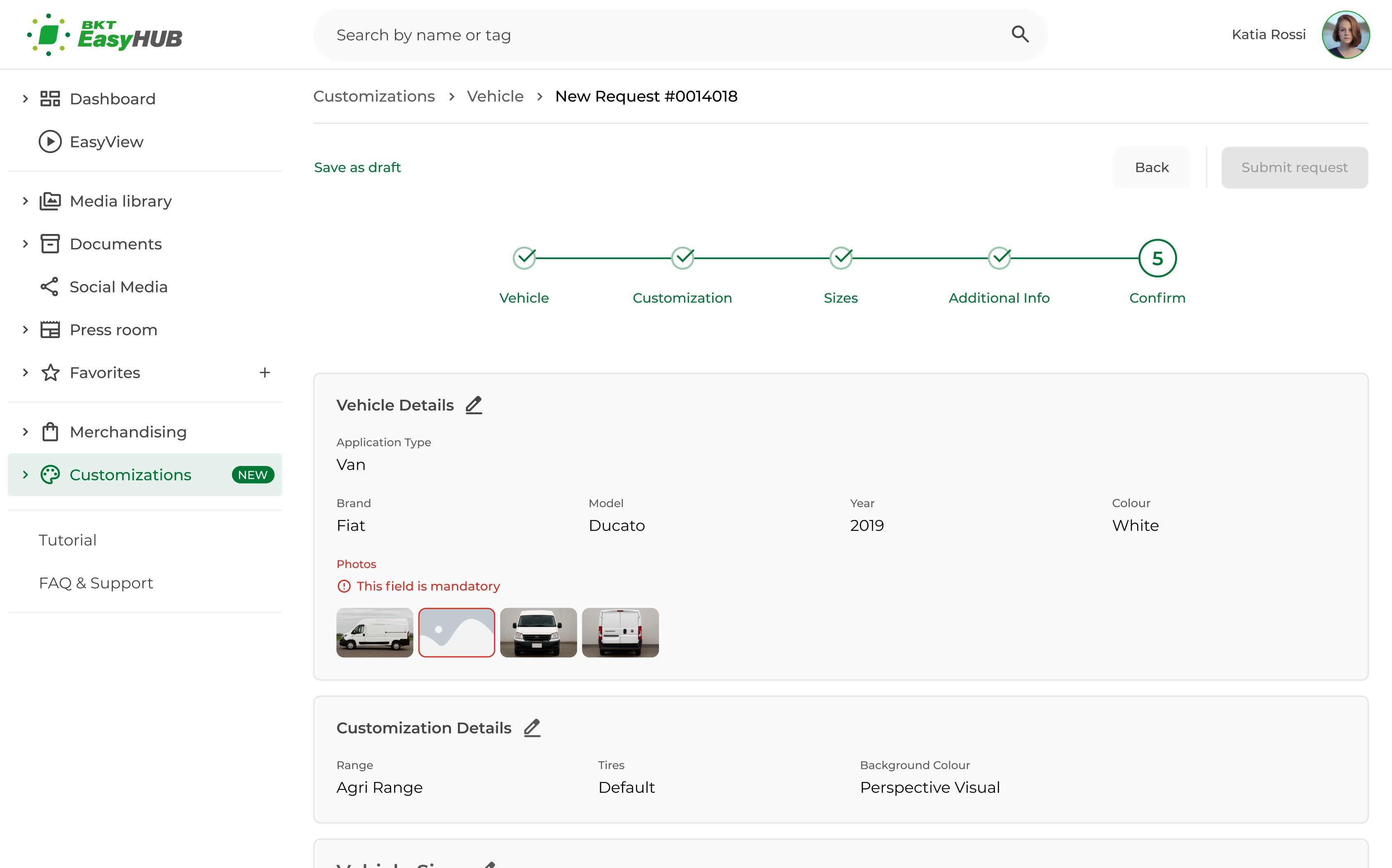
Confirm. The summary consolidates every value entered. Missing or wrong fields are flagged in red with edit shortcuts, keeping the "Submit" button disabled until the request is valid.
My Requests
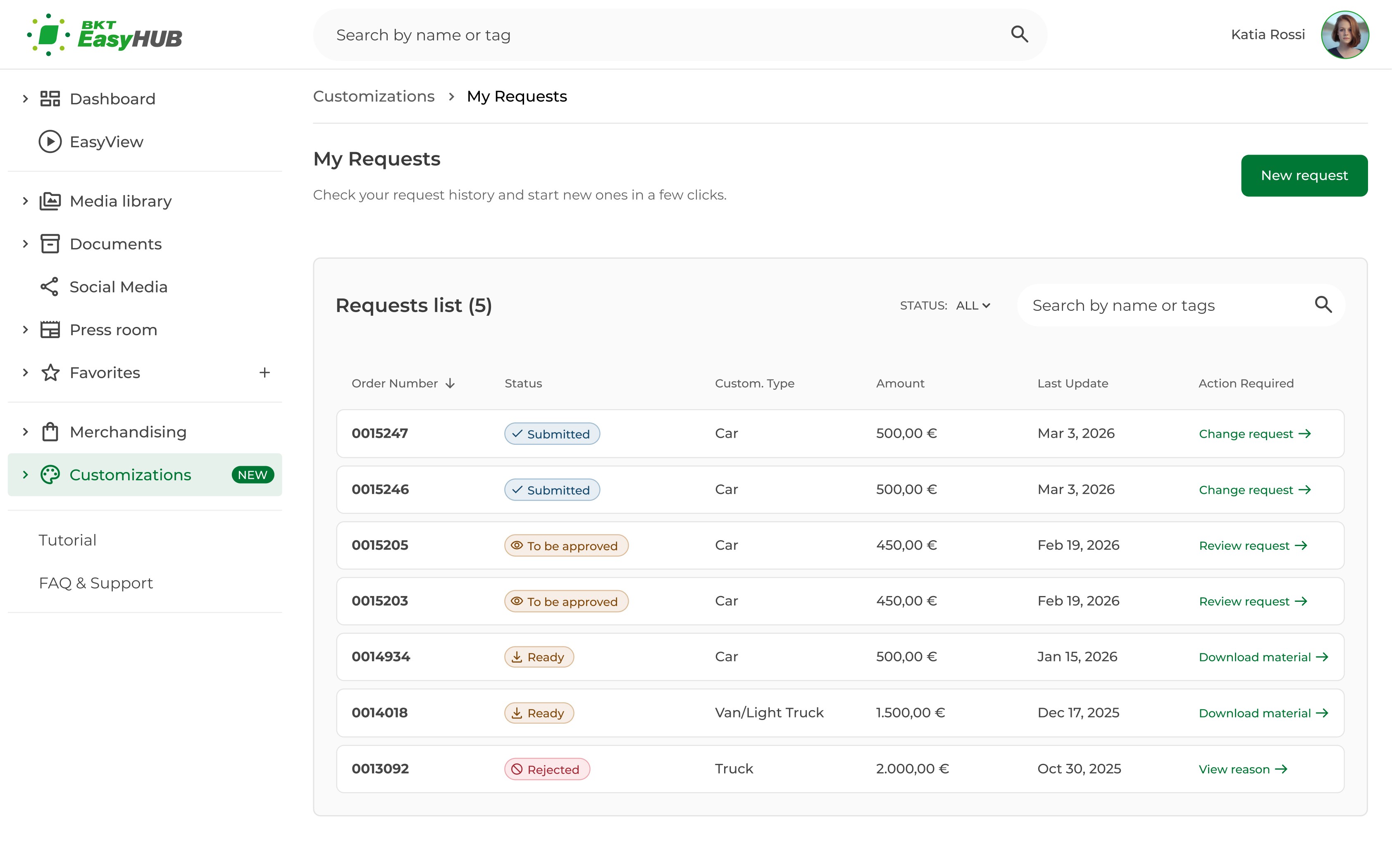
My Requests. Centralises every customization in 1 list. Status, type, last update and the next required action are visible at a glance. No more phone, email and WhatsApp.
Impact
Customization Requests launches by end of 2026. The module will be presented to BKT customers in 2026 at the annual marketing event, ahead of full release.
Pre-launch outcomes are architectural, not behavioural.
Single entry point replacing phone, email and WhatsApp
Fully documented state machine covering the request lifecycle
Component architecture extending the existing BKT design system
6 flows designed and handed off, approved by PM, dev team and BKT stakeholders
Vehicle workflow as the template for the other 5
Behavioural metrics (request completeness, owner workload, distributor satisfaction) will be measured after launch.
Learnings
System maps before screens. Architecture and lifecycle came first, before any UI. Every later decision fit into one system, not separate fixes
Cross-functional handoff is design work too. State docs, edge case maps, component specs were designed as carefully as the screens. The handoff is part of the product.
Pre-launch case studies need a different lens. Without behavioural metrics, the work rests on architecture, decision quality and stakeholder approval. Those become the currency.
8 months on this project showed me one thing: design doesn't stop at the screens. It happens in the state mapping, in the architecture, in the patterns that 5 other flows can build on.
Thanks to: Luciana
Next Project